Inventory
See your wallets at a glance, choose the active one, and reach your everyday actions.
Built around the way you collect.
Your wallets, tokens and digital binders, connected to the way you follow the game. Start with your collection, keep favourite holdings close, and explore Web3 features at your own pace.
Opens the web app in a new tab.
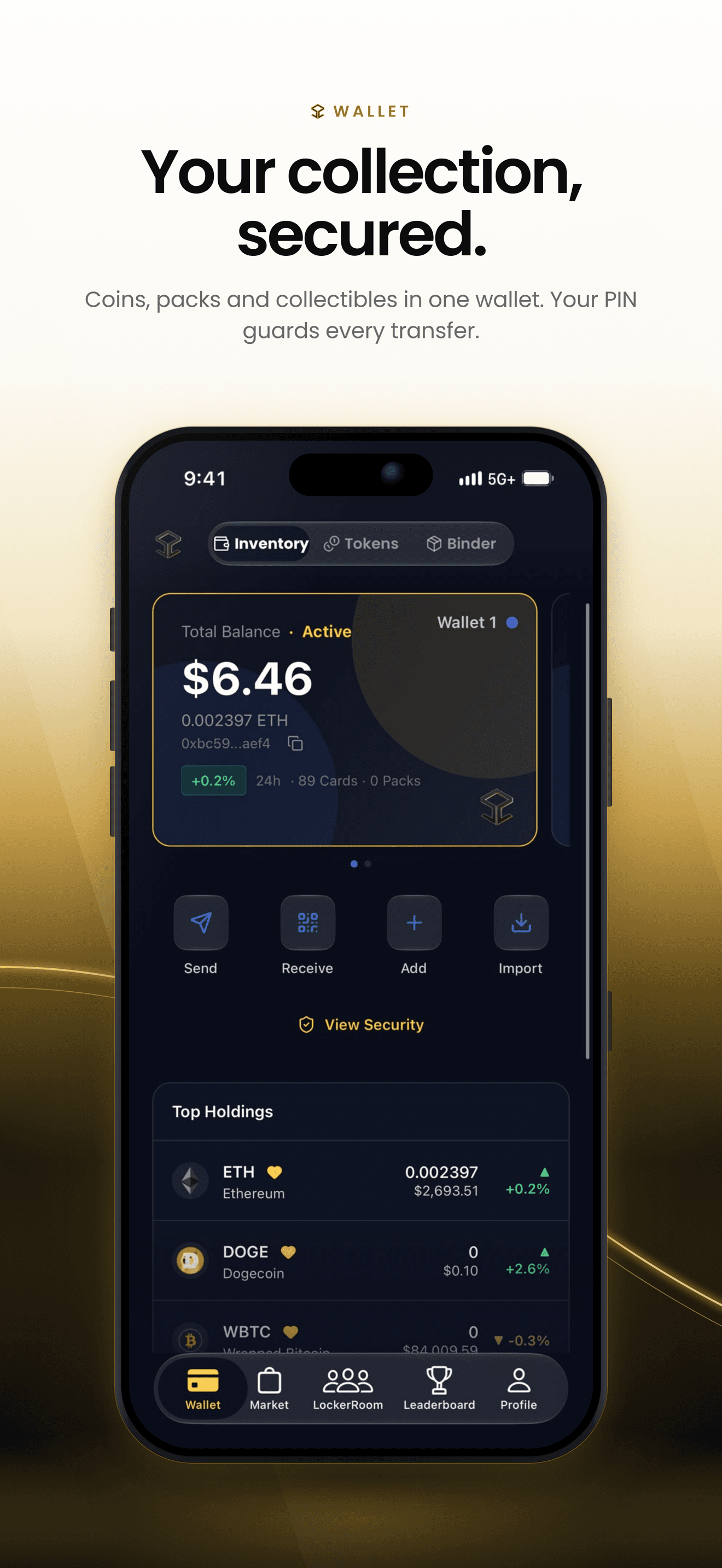
Three views. One place to start.
See your wallets at a glance, choose the active one, and reach your everyday actions.
Search the token list, check balances and prices, and favourite the assets you follow.
Open your digital collection, browse card pages and see the packs waiting to be opened.
A dashboard for the everyday details: your balance, wallet address, active wallet and security options. Start here, then go deeper into Tokens or Binder.
Check the displayed wallet balance, then explore individual token quantities and quoted prices. Your digital cards remain a separate collection.
Copy your wallet address from Inventory or open Receive for its QR code. Confirm the network before sharing an address for a transfer.
Switch between wallets using the selector, and reach Send, Receive, Add and Import from the main screen.
Open View Security for the available recovery options. Sensitive app-managed wallet actions use PIN verification.
Digital Binders
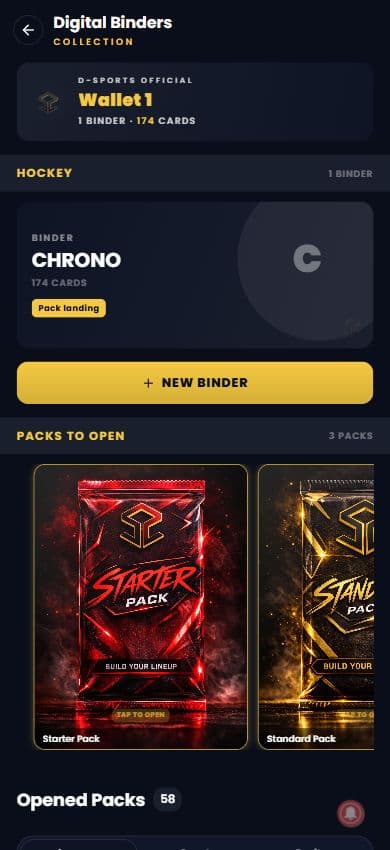
The Binder view takes you from Wallet to your collection. Find the packs you own, return to opened packs and arrange your cards in digital binders.
See sealed packs waiting to be opened and revisit opened packs. Your binder pages bring the cards together so you can return to your collection as it grows.
Browse the rarity labels on your cards and use the binder’s rarity filters to focus on a tier. Visit the Shop guide to explore collectible rarities and available packs.
Create binders for the way you collect, grouped by sport and team. Choose the pack landing binder and keep an optional PIN on binders you want to lock.
Wallet PIN verification protects entry to Binder. A binder’s own PIN is a separate protection when you choose to use it.
Screen 1 of 2
The Tokens view
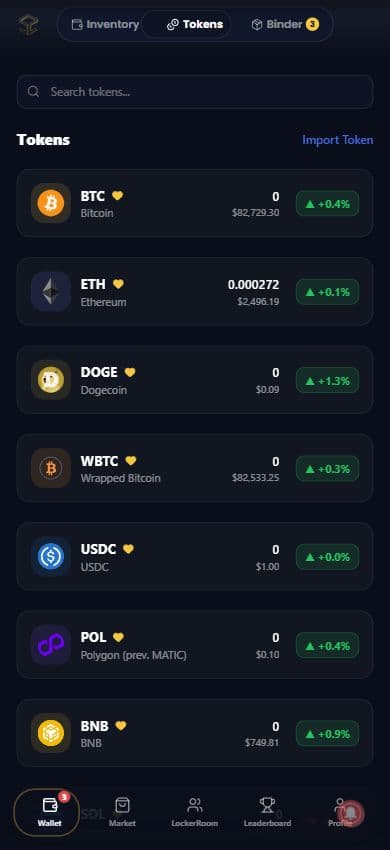
Find the token you are looking for and see its balance alongside market-price information. Keep favourites close without turning every visit into a deep dive.
Search tokens by name or symbol and open a token to see its details. Use the list to explore the assets available in the app.
See token quantities, quoted prices and price changes together. Market prices describe the token; they are separate from the amount you hold.
Favourite tokens in the list to bring them into Top Holdings on the Inventory screen.
Top Holdings
Inventory keeps your favourite tokens in Top Holdings beneath the wallet actions. See quantities, market prices and price movements, then open a token when you want more detail.
A favourite can appear here even when its balance is zero. This is your shortcut to the tokens you follow, rather than a promise of value or returns.
See the Tokens view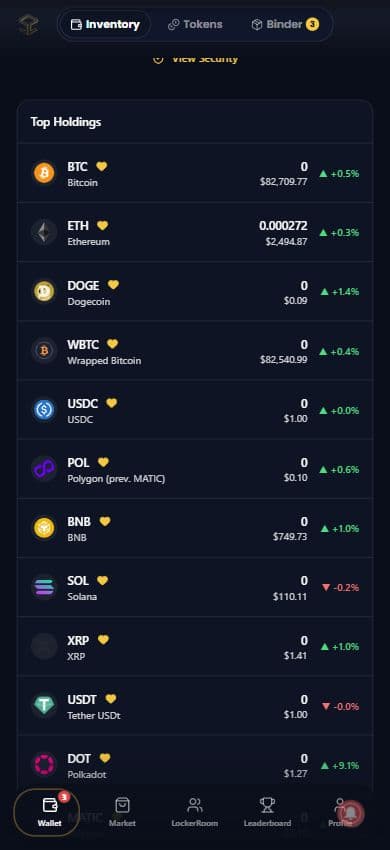
Wallet management
Use the wallet you already have, add another, or bring one with you. The app guides each action through its own flow.
Manage multiple wallets from one interface. Connect an external wallet through the available providers or create an app-managed wallet, then use the selector to choose the one you want to work with.
Sending and receiving involve a blockchain network. Fees and confirmation times vary; check the recipient, network and amount before you confirm.
Choose a supported network, enter the recipient and amount, and review the details. App-managed wallet transfers ask for your wallet PIN before signing.
Find your wallet address and QR code in one place. Check that the sender is using the correct network for the asset you want to receive.
Create another app-managed wallet or connect an existing wallet through the providers offered in the app. Use the wallet selector to move between them.
Bring an existing wallet into D-Sports through the protected private-key import flow. Keep the original recovery information safe and set the requested wallet PIN.
Security and recovery
Your wallet PIN protects sensitive app-managed wallet actions. Use the recovery and security options for the wallet you are managing, and keep its recovery information private.
Read about D-Sports securityApp-managed wallet sends require PIN verification. Wallet creation and import also ask you to set a PIN, and Binder uses its own unlock flow.
On supported native devices, enable the available biometric wallet-lock and binder-unlock options. Device support and your settings determine availability.
Use View Security and the app’s verification prompts to access available recovery information. Never share a private key, recovery phrase or PIN with another fan or in a support message.
Made for fans and collectors
The wallet connects the practical details of your digital assets with the sports community around them. Explore the features that fit the way you use D-Sports.
PIN checks and optional native biometric unlock put protection around sensitive wallet and binder actions.
Explore wallet protectionThe native Send flow offers Ethereum, Polygon and Arbitrum. Review the network and asset before confirming a transfer.
See supported networksKeep packs and cards together, browse by rarity and organize digital binders around the way you collect.
Explore your collectionFollow token prices and percentage changes, then bring favourites into Top Holdings for a quicker view.
Explore Top HoldingsTake your inventory, tokens and binders with you in the D-Sports Engage app for iOS and Android.
Get the mobile appMove from your collection to Locker Room conversations, Team HQ coverage and the Market’s trading community.
Explore Locker RoomNo. You can enjoy the fan community and collect digital cards without learning every Web3 feature. Wallet brings your inventory and binders together; token transfers are available when you choose to use them.
The current native Send flow offers Ethereum, Polygon and Arbitrum. Use the network and native-token options shown in the app. Fees, confirmation time and availability depend on the network; a token appearing in the price list does not mean every network is supported for transfers.
Tokens gives you the searchable token list, balances and market-price information. Top Holdings puts your favourite tokens on the Inventory screen, so the assets you follow are easier to find.
Choose Binder in Wallet and unlock it with your wallet PIN when prompted. Digital Binders shows your collection, sealed packs and opened packs. Open a binder to browse card pages and filter by rarity; individual binders can also have their own PIN protection.
Use the app’s wallet settings and recovery flow for the wallet you are managing. For help getting started, visit D-Sports Support. Never send your private key, recovery phrase or wallet PIN in a support message.
Make it your game day
Open Wallet to find your inventory, favourite tokens and digital binders.
Opens the web app in a new tab.
Follow the club behind your collection with its roster, standings, fixtures and match coverage.
Explore Team HQFind digital packs, organize your binders and trade with fans in the Market.
Explore the Market